How to Find Chinese-Language Works on AO3
This English version is not a line-by-line translation of the Chinese guide. The original was written for Chinese readers moving from Chinese content platforms to AO3. For English-language readers, the more useful question is a little different: how do you find Chinese-language works, Chinese translations, or works connected to Chinese fandoms on AO3?
AO3 search is powerful, but it is not a recommendation engine. It does not try very hard to guess what you meant. Tags, filters, and the conditions you type all work together. If you are looking for Chinese works, the trick is usually not to throw more words into the homepage search box. It is to split the question.
Do you want works written in Chinese? Chinese translations? Works about a Chinese canon, even if the fic is in English? A specific pairing? A completed longfic? A recent update? Something that avoids particular warnings or tropes?
Once you separate those needs, AO3 becomes much easier to use.
The short version: do not rely only on the homepage search box
AO3’s top search box is convenient, but it is blunt. If you type only a Chinese keyword, the results may come from titles, summaries, tags, notes, or other text fields. Chinese titles, pinyin, English translated names, ship nicknames, abbreviations, and freeform tags can all mix together.
A more stable search pattern is:
| |
For example, if you want Chinese-language works in a specific fandom, first go to that fandom tag. Then use Language, Completion status, Word Count, Include, and Exclude. Only after the range is clear should you add keywords.
AO3 is closer to an archive than to a search engine that tries to read your mind. Find the right cabinet first, then the right drawer.
Why Chinese-related searches can be tricky
There are several common reasons.
Chinese keywords may not match canonical tags. The same canon or character can have a Chinese name, English name, pinyin, abbreviation, nickname, or ship name. A fandom may appear under Chinese title, pinyin title, or English translated title. Searching one form can miss another group of works.
Many tags are still in English. Even when the work itself is in Chinese, authors may tag with Happy Ending, Alternate Universe - Modern Setting, Slow Burn, Angst, and other English tags. Searching only Chinese trope words can miss many works.
The language field and tag fields are different. A work marked as Chinese in Language does not necessarily use Chinese tags. A work with Chinese fandom tags or Chinese notes is not necessarily written in Chinese. If you want Chinese prose, use the Language filter or language_id:zh. The language field is about the work’s text, not the site interface.
AO3 expects explicit conditions. AO3’s own explanation notes that multiple filter choices often behave like AND searches. If you want “this or that,” use OR. If you want to exclude something, use NOT or a minus sign1.
Method one: use Work Search when your target is clear
If you already know roughly what you want, go to Search -> Works. On mobile, the page is long and can look like a form maze, but it is divided into a few areas: work information, work tags, work statistics, and sorting.
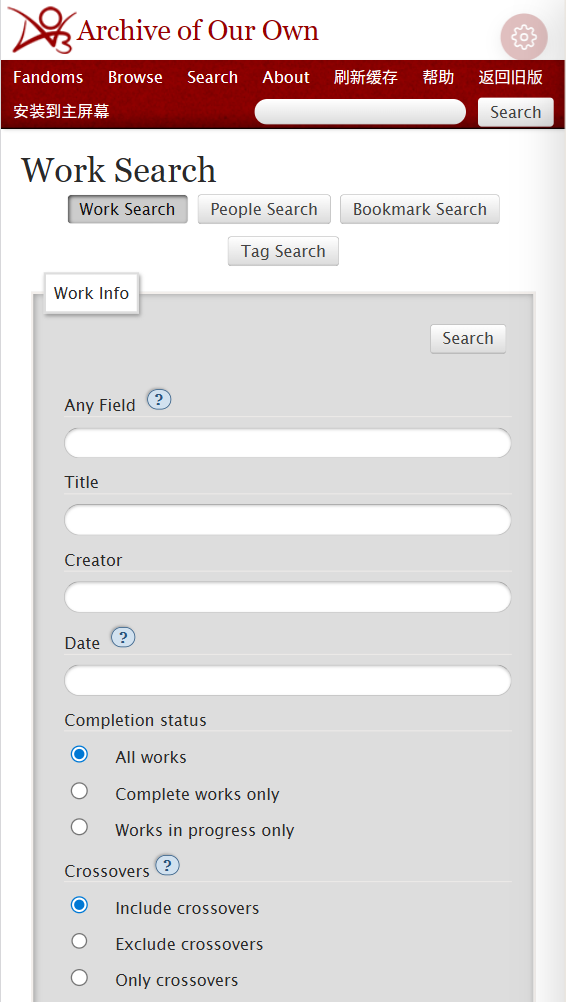
The most useful fields near the top are:
Any Field: flexible, good for keywords, phrases, and operators.Title: search titles only.Creator: search author usernames.Date: search by date.Completion status: complete or incomplete works.Word Count: word-count ranges.Language: the language of the work text.
Suppose you want works related to Mo Dao Zu Shi, with happy endings, between 10,000 and 50,000 words, written in Chinese. You might split the request this way:
- Put
魔道祖师 AND "happy ending"inAny Field. - Put
10000-50000inWord Count. - Choose
Complete works onlyif you only want completed works. - Choose
中文-普通话 國語inLanguage, or uselanguage_id:zh.
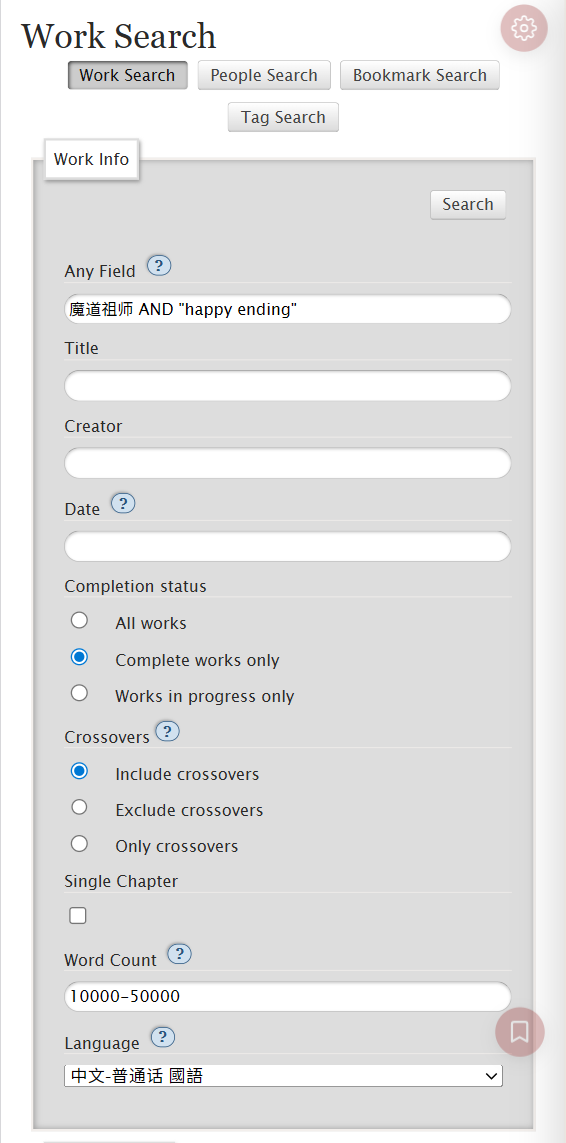
After submitting, check the top of the results page. AO3 lists the conditions it actually used. This is the fastest way to catch a typo or a condition placed in the wrong field.
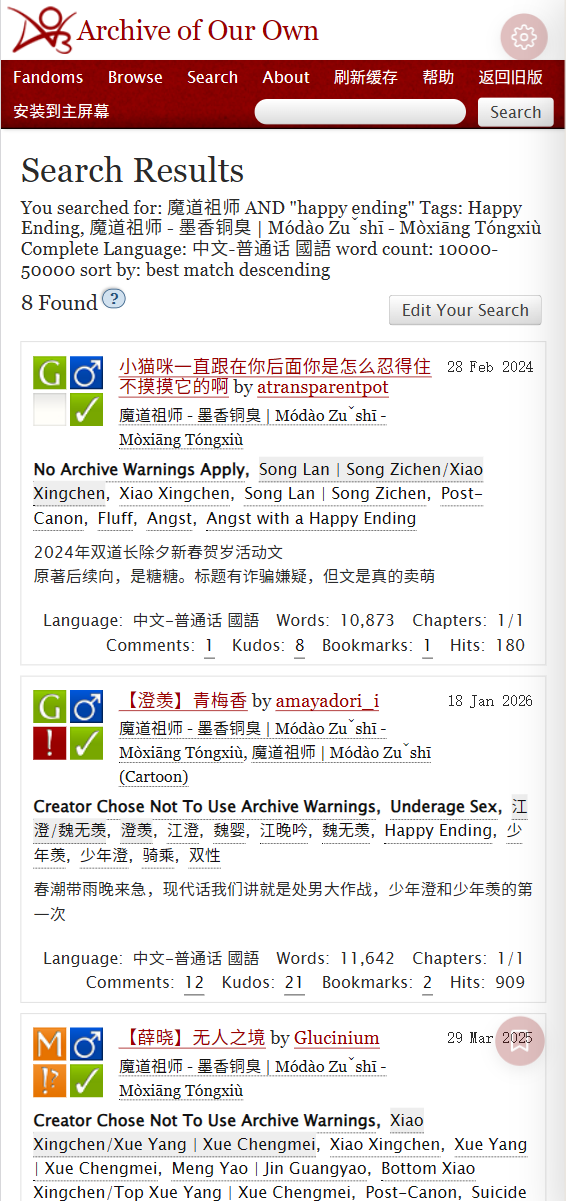
Two small details help a lot:
AND, OR, and NOT are best written in uppercase. AO3’s hidden search operator documentation is sensitive to formatting, including spaces after colons in some cases2. Treat it like a search language, not like a casual web search box.
Use straight double quotation marks for phrases. "happy ending" keeps the phrase together more reliably than happy ending. This can also help with exact Chinese titles or fixed character names.
Method two: put tags in tag fields, not all in Any Field
Any Field is useful, but it is not a universal drawer. AO3 is built around tags. If something belongs in a tag field, put it there.
Scroll down on mobile and you will see Work Tags.
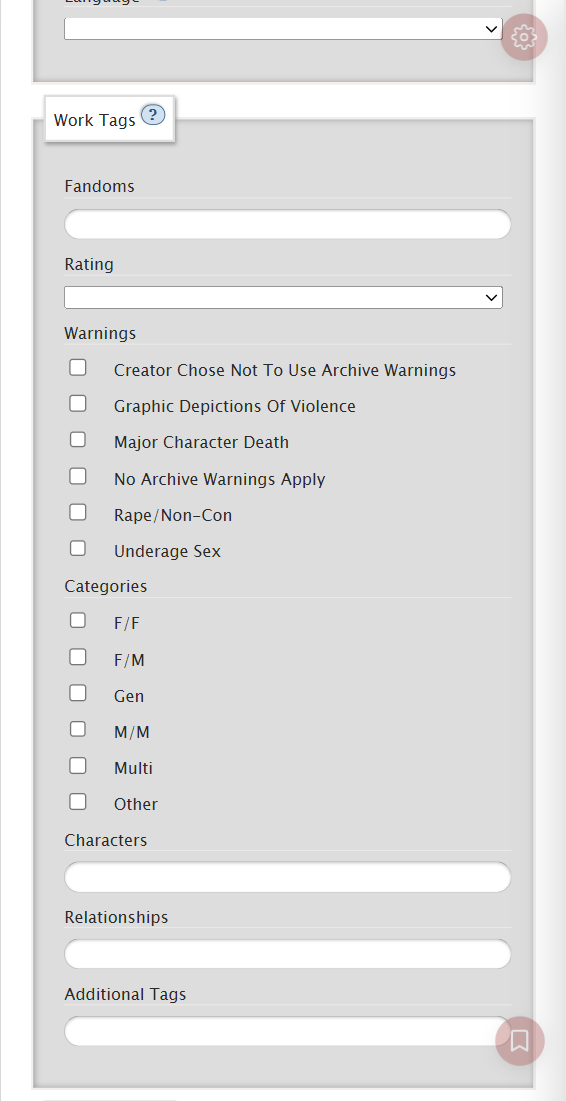
The common fields mean:
Fandoms: the canon or fandom, such as魔道祖师 - 墨香铜臭 | Módào Zǔshī - Mòxiāng Tóngxiù.Characters: characters.Relationships: relationships or ships. Slash/usually marks romantic or sexual relationships; ampersand&usually marks platonic or non-romantic relationships.Additional Tags: tropes, setting, mood, AU, endings, extra warnings, and similar material.Warnings: AO3 archive warnings for higher-sensitivity material that readers may want to avoid.Categories: relationship categories such as M/M, F/F, Gen, and so on.
If you want a modern AU with a lighter ending in one fandom, put the fandom in Fandoms and tags like Happy Ending, Alternate Universe - Modern Setting in Additional Tags.
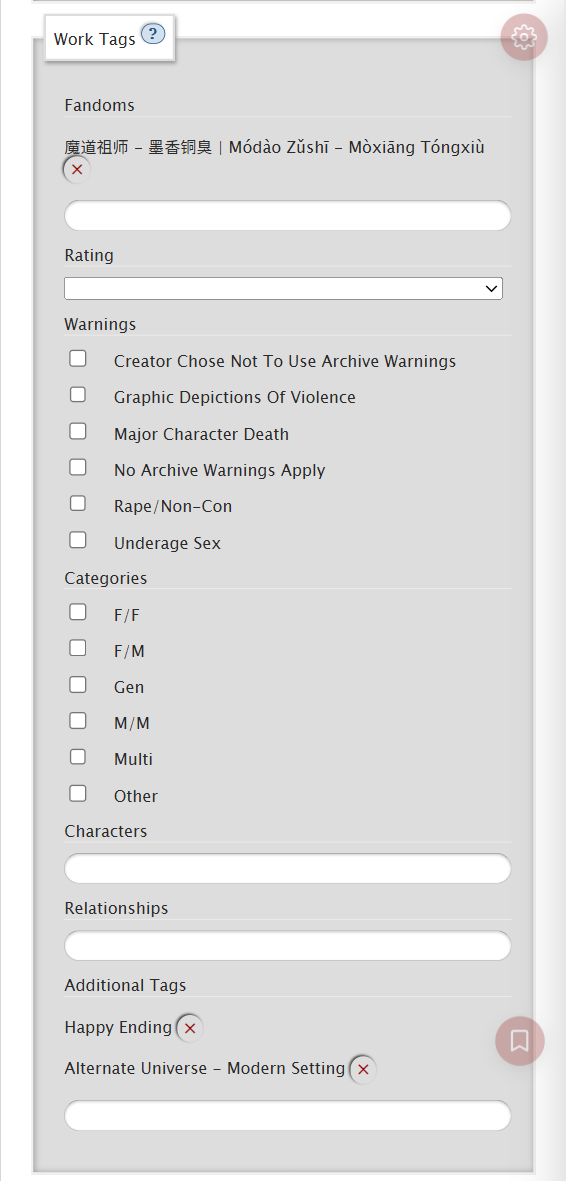
AO3 has canonical tags and freeform tags. If autocomplete suggests a canonical tag, prefer it. If it does not, you can still type a tag, but results may be less stable. This is especially true for Chinese tags. Some have been wrangled; some are only an author’s freeform expression.
If you do not know the canonical relationship tag for a ship, do not guess from a Chinese ship nickname. Start from the fandom tag, look at works in the results, and observe the Relationships field. Once you see the full AO3 relationship tag, copy that exact tag.
For Chinese-related searching, a practical combination is often: Chinese canon name + English common trope tags + language filter.
Method three: start from a fandom tag when you want to browse
Often the best entry point is not Advanced Search. It is a fandom, relationship, or character tag page.
For example, if you enter the works page for 魔道祖师 - 墨香铜臭 | Módào Zǔshī - Mòxiāng Tóngxiù and open Filters, you can narrow by rating, warning, character, relationship, additional tag, word count, completion status, language, and sorting.
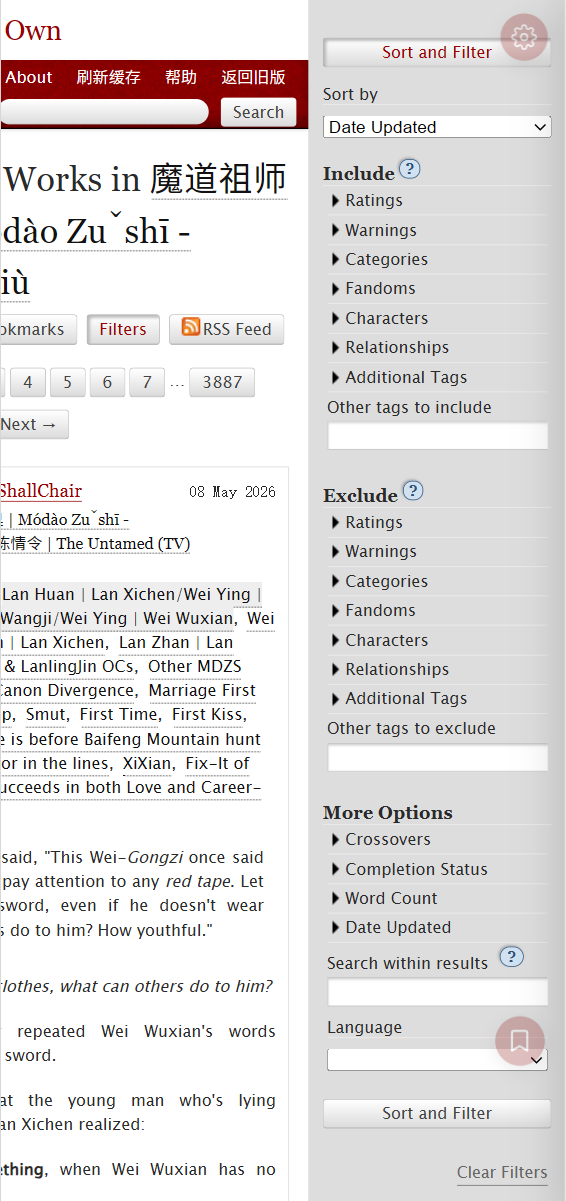
This is especially useful when the fandom has Chinese, pinyin, and English forms. Once the fandom is fixed, searches for 甜, HE, Happy Ending, 现代, or Modern Setting are less likely to drift into unrelated works.
A stable workflow is:
- Find the fandom or relationship tag page.
- Open
Filters. - Add wanted relationships, characters, or additional tags under
Include. - Remove unwanted warnings, characters, relationships, or additional tags under
Exclude. - Choose completion status, word count, and language under
More Options. - Add extra words in
Search within results. - Click
Sort and Filter.
On mobile, the filters panel can feel long. You do not need to fill everything at once. AO3 works well when you narrow step by step: language, then completion, then word count, then exclusions. If results are still too broad, add one condition. If they disappear, remove one.
Method four: exclusions are often stronger than more keywords
Many people keep adding search words when results are messy. On AO3, excluding what you do not want is often more effective.
If you want lighter works, start by excluding archive warnings or the option where a creator chose not to specify archive warnings.
If you do not want a character, relationship, or AU, put it under Exclude. On mobile fandom pages, Include and Exclude are separate. It is easy to put something in the wrong place, so check before submitting.
What if unwanted ships keep appearing?
Many AO3 works tag multiple relationships. Searching for one ship can still show works that also include another relationship. That does not always mean your search is wrong; the work may really have both.
Do not keep piling terms into the keyword box. Open Filters, go to Exclude -> Relationships, and select or enter the relationship you do not want.
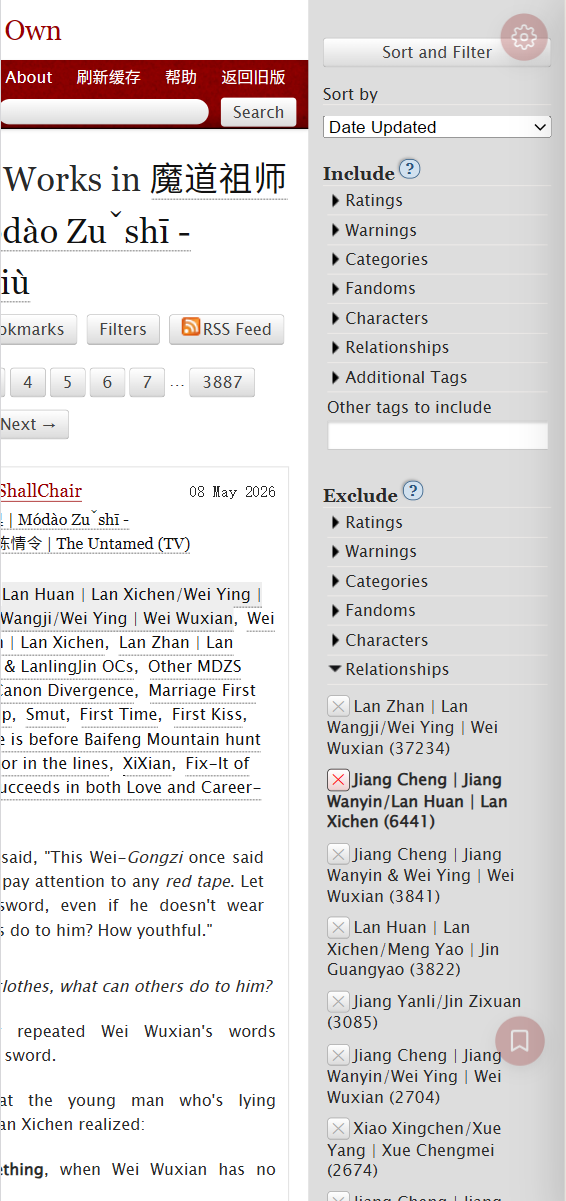
If you are not sure how the canonical relationship tag is written, open a related work and copy the tag from its relationship list. You can also expand Exclude Relationships in the results sidebar and choose directly.
Method five: word count, completion, and sorting change the reading experience
Word count, completion status, and sorting answer the practical question: what do you want to read today?
Common examples:
Word Countas0-5000: short works.Word Countas10000-50000: mid-length works.Word Countas>100000: long works.Completion statusasComplete works only: completed works.
Farther down, Work Stats and Search control popularity indicators and sorting:
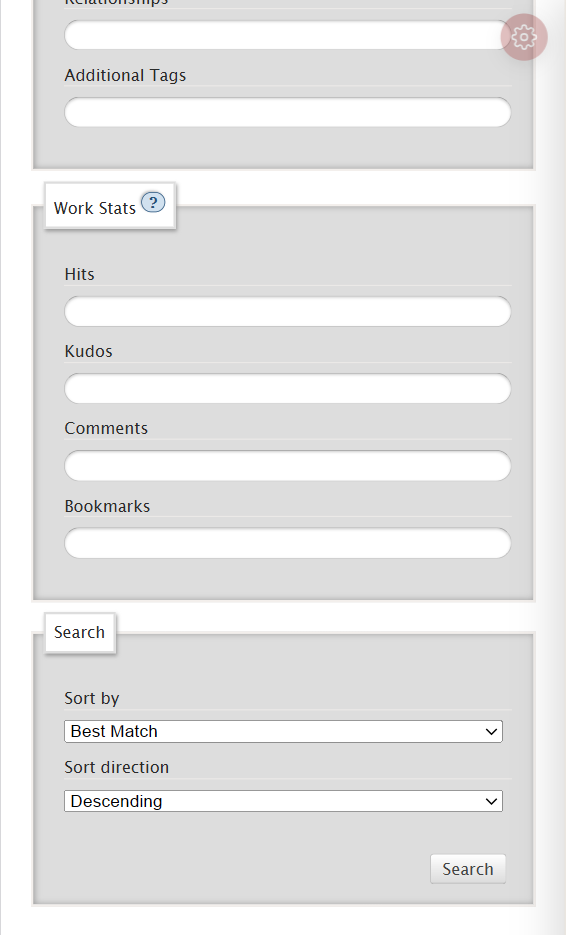
Useful fields include:
Hits: page views.Kudos: likes.Comments: comment count.Bookmarks: bookmark count.Sort by->Date Updated: recent updates.Sort by->Kudos: widely liked works.Sort by->Bookmarks: works many readers saved.
Do not treat kudos as the only measure of quality. Kudos are affected by fandom size, language, ship popularity, publication date, and visibility. Chinese-language works, small fandoms, rare ships, and new works may have lower numbers for reasons unrelated to quality.
If you want active recent serials, sort by Date Updated. If you want long works many readers have saved, try Bookmarks with a word-count range.
Method six: use search syntax for what filters cannot do
AO3 has hidden search operators. The official cheatsheet says these can be used in the top search box, Work Search’s Any Field, and filter-side Search within results2.
You do not need to memorize everything. These are enough to start:
| Goal | Query | Where to use it |
|---|---|---|
| Works over 10,000 words | words>10000 | Any Field / Search within results |
| Works between 10,000 and 50,000 words | words:10000-50000 | Any Field / Search within results |
| Sort by kudos | sort:kudos | Any Field |
| Sort by bookmarks | sort:bookmarks | Any Field |
| Sort by update date | sort:updated | Any Field |
| Chinese-language works | language_id:zh | Any Field / Search within results |
| Exclude English-language works | -language_id:en | Any Field / Search within results |
| Exact phrase | "slow burn" | Any Field / Search within results |
| Either trope | "happy ending" OR fluff | Any Field / Search within results |
| Fandom plus ending tag | 魔道祖师 AND "happy ending" | Any Field / Search within results |
| Exclude modern AU | NOT "Alternate Universe - Modern Setting" | Search within results |
| Only one relationship tag | otp: true | Search within results |
| Exclude a word | -现代 | Any Field / Search within results |
For example:
| |
This roughly means: find Chinese-language works related to Mo Dao Zu Shi and happy endings, between 10,000 and 50,000 words, sorted by update date.
The more complex the syntax, the easier it is to lose results because one word or format is wrong. Start with filters, then add one or two syntax conditions in Search within results.
Method seven: separate three different “Chinese” searches
When someone says “I want Chinese works,” they may mean three different things.
The work text is Chinese. Use the Language filter for 中文-普通话 國語, or use language_id:zh. This searches the language of the work text. It does not change AO3’s interface language and does not split simplified and traditional Chinese.
You want Chinese translations. Try tags such as 中文翻译 | Translation in Chinese, Translation in Chinese, Chinese Translation, or 中文翻译 within a fandom page. Translation tags are not fully uniform, so trying several forms is normal.
You want works related to a Chinese canon or Chinese fandom, regardless of work language. Do not restrict language too early. Start by finding the right fandom or relationship tag, then use common English additional tags. Many English works about Chinese canons use pinyin fandom tags or English relationship tags.
Separating these three goals prevents a lot of false frustration. Sometimes AO3 is not “bad at finding Chinese.” The search is mixing Chinese text, Chinese translations, and Chinese-canon works into one unclear request.
Example: Wangxian, completed Chinese works, no modern AU
Suppose you want Wangxian works from Mo Dao Zu Shi, preferably in Chinese, complete only, excluding modern AU and one archive warning you do not want.
Do not only search 忘羡 from the homepage. A more stable process is:
- Go to the fandom tag page for
魔道祖师 - 墨香铜臭 | Módào Zǔshī - Mòxiāng Tóngxiù. - Open
Filters. - Under
Include->Relationships, choose or enterLan Zhan | Lan Wangji/Wei Ying | Wei Wuxian. - Under
Exclude->Warnings, exclude the archive warning you do not want. - Under
Exclude->Additional Tags, excludeAlternate Universe - Modern Setting. - Under
More Options, chooseComplete works only. - Under
Language, choose中文-普通话 國語. - If there are still too many results, add a word-count range or put
NOT "Alternate Universe - Modern Setting"inSearch within results. - If you want works with only one relationship tag, try
otp: true, but remember it may exclude works where Wangxian is the main ship and background ships are also tagged.
The point is not that Wangxian must be searched exactly this way. The point is the order: fix the fandom and relationship, exclude what you do not want, then add keywords.
Quick questions
Why is searching 忘羡 less stable than using the relationship tag?
Because 忘羡 may appear in a title, summary, freeform tag, note, or not appear at all. The canonical relationship tag is more stable. If you see the right relationship tag on a work, click it and filter from there.
If a Chinese tag gives no results, does that mean the works do not exist?
Not necessarily. Many works use English tags such as Fluff, Angst, Happy Ending, or Alternate Universe. Try both Chinese words and common English tags.
Why do results disappear when I add more filters?
Most filters behave like AND. Choosing Happy Ending, Alternate Universe - Canon Divergence, and Complete works only usually means all of them must be true. If you want either one or another, use OR, such as "happy ending" OR fluff.
How should I avoid content I do not want?
Start with Warnings, then Additional Tags. Use Exclude for warnings or tags you do not want. If you strongly want to avoid archive-warning content, you may also exclude Creator Chose Not To Use Archive Warnings, because that means the creator chose not to specify archive warnings.
How do I find good works in small fandoms?
Do not rely only on kudos. Try Date Updated for recent activity or Bookmarks for works readers saved. Small fandoms, Chinese-language works, rare ships, and new works may all have lower stats.
Treat AO3 like an archive
AO3 search can feel awkward at first, especially if you are used to platforms that guess, recommend, and autocomplete aggressively. AO3’s strength is different. It gives you filters and expects you to decide what you want, what you do not want, and how to sort it.
If you remember one thing, remember this:
Start with the tag range, use filters, then add keywords.
Do not fight the homepage search box for too long. Find the fandom or relationship tag, open Filters, and narrow the range step by step. AO3 will not immediately serve the perfect work to you, but once the conditions are clear, the archive is more cooperative than it first appears.
AO3, “Searching and browsing on the AO3,” explains that multiple filter selections often create AND searches, and that OR or NOT searches require search syntax such as
Search within results. https://archive.transformativeworks.org/admin_posts/259 ↩︎AO3, “Hidden search operators cheatsheet,” lists operators such as
words,sort,language_id,AND,OR, andNOT, and explains where they can be used. https://archive.transformativeworks.org/admin_posts/10851 ↩︎ ↩︎